Your quiz, drafted from your own material
Upload the material you already teach from. SkillLens drafts the whole assessment; you review every question before it saves.
Assessment for professional training
SkillLens drafts your quiz from your own material, scores the written answers, and shows you what actually landed: while you can still do something about it.
Free plan, no card, no trial clock. Client report and attestations included.






Already used to run training for







On the projector
Attendees answer on their own phones: a link and a code, no account, no app. Close the step and the room sees the distribution and a verdict: no name, no ranking, no winner.
Margin vs. markup: which figure does the client see?
Capability
Upload the material you already teach from. SkillLens drafts the whole assessment; you review every question before it saves.
Multiple choice graded against your key. Written answers analysed into a one-sentence verdict, with the correct fact stated.
No names, no ranking, no winners. Guaranteed by the shape of the data rather than by a checkbox.
A follow-up link re-asks the same questions weeks later. Reports compare before with after, per competency and for the group.
Before, during, after
Open a placement test while the room settles. You know what they already have instead of guessing.
Step through checkpoints at your own pace. Each close tells you whether the idea landed or needs another pass.
Close the session and get the before/after picture: per competency, per attendee, and for the group as a whole.
Kirkpatrick model
Answered plainly
Your material drafts the assessment, then it is deleted. We keep no copy and nothing is trained on it.
Anyone can download or erase everything we hold about them, from their own screen. An erasure can be undone for 30 days.
Detailed results stay in your workspace. The client report carries no personal data: no names, no emails, no individual rows.
Audit-ready evidence
Dated results, progress per competency and a report you can hand over: produced while you run the session, not reconstructed the night before an audit. For French training organisations, this is what Qualiopi indicator 11 asks for.
Every sitting is tied to an identifiable, dated session: the evidence exists because the assessment happened.
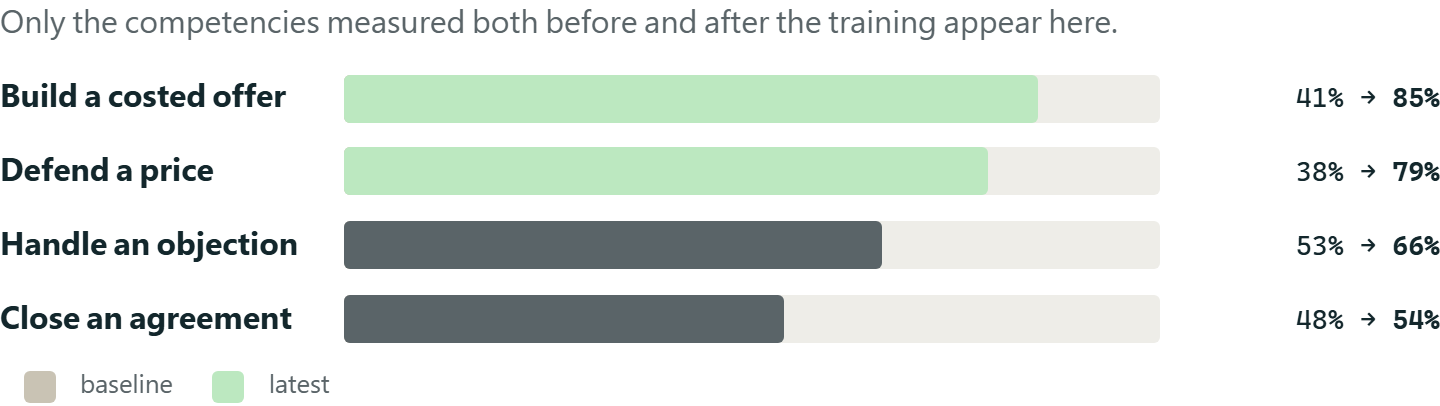
Each training objective with its status, and the success rate before and after, competency by competency: not one overall mark.
A printable report and a read-only summary link for the client, aggregate and with no attendee named.
On the paid plans, an individual follow-up goes out as a link at D+7 and D+30, with no account to create; the trainer sees it beside the session answers, and the client report shows it wave by wave.
SkillLens provides evidence. It issues no certification and does not stand in for your certifying body: an audit examines your organisation and your processes, not a tool.


Frequently asked
About evaluating training in general, and about SkillLens in particular.
Not on the list?
Ask us directly and we will answer it: contact@liteailabs.com
By measuring three moments rather than one: what people knew before, what they follow during, and what survives afterwards. The satisfaction sheet handed out at the end measures how the day felt: useful, but it does not say what was learned. SkillLens runs all three: a quiz beforehand to establish the starting level, open steps released one at a time during the session, and a recall check a few weeks later.
Immediate evaluation happens right after the session and captures satisfaction and the feeling of having learned. Delayed evaluation comes weeks later and measures what was actually retained and carried back to the job. Both matter, and the second is the one almost nobody runs, because it means bringing back a group that has dispersed. On the paid plans, SkillLens sends each participant an individual follow-up as a link, with no account to create, which you see beside their answers from the session; the client report then shows what was retained, wave by wave.
By comparing the same competencies at two moments. Every question can be tagged with a competency; the report then shows the success rate per competency before and after, rather than one overall mark that hides which idea landed and which did not. That per-competency reading is what tells you what to reteach.
No. An attendee opens the session link, enters the access code you give them, and answers. No account, no app, nothing to install. That is deliberate: every sign-up step loses part of the room, and an evaluation half the group never answers stops measuring anything.
Never. What is projected to the room is always aggregate: distributions, rates, trends. No names, no ranking, no individual answers. The trainer does see the per-person detail: that is their job. Nobody is exposed in front of their colleagues or their manager.
The material you upload is used to draft the questions and is then deleted. We keep no copy of it and it trains no model. It is transmitted to the model provider for the duration of that drafting: that is what makes the questions about your content rather than about generalities.
Yes, for the part that falls to you: indicator 11 requires you to evaluate whether your learners reached the objectives and to be able to show it. SkillLens produces dated evaluation results tied to an identifiable session, the status of each training objective, measured progress per competency between before and after, a report per session, and a summary you can hand to the client who paid for the training. It is not certification (an audit examines your organisation and your processes, not a tool) but it replaces the folder assembled after the fact.
Yes, and it is not a trial: it does not expire and asks for no card. It includes live stepping, quiz scoring, the room pulse, the client report and an attestation per participant, both carrying the “Made with SkillLens” mark, as on every plan. Cold follow-up (D+7 / D+30) and the results email to participants are on the paid plans, as is the AI budget for the features that call a model.
For independent trainers, training organisations and monitoring-and-evaluation leads: the people who have to show what a course changed (to a funder, a quality audit or a donor's logframe) not only that it happened.